
Lead Gen
Pinpoint key leaders inside any company with a single click

Gaurav Bhattacharya
CEO, Jeeva AI
Overview
The Find Decision Makers workflow lets you instantly identify key leaders inside any company. Simply provide the company website and specify decision-making criteria (like CEO, VP Sales, CTO), and Jeeva AI surfaces verified contacts. You can run it for a single company or upload a bulk list.
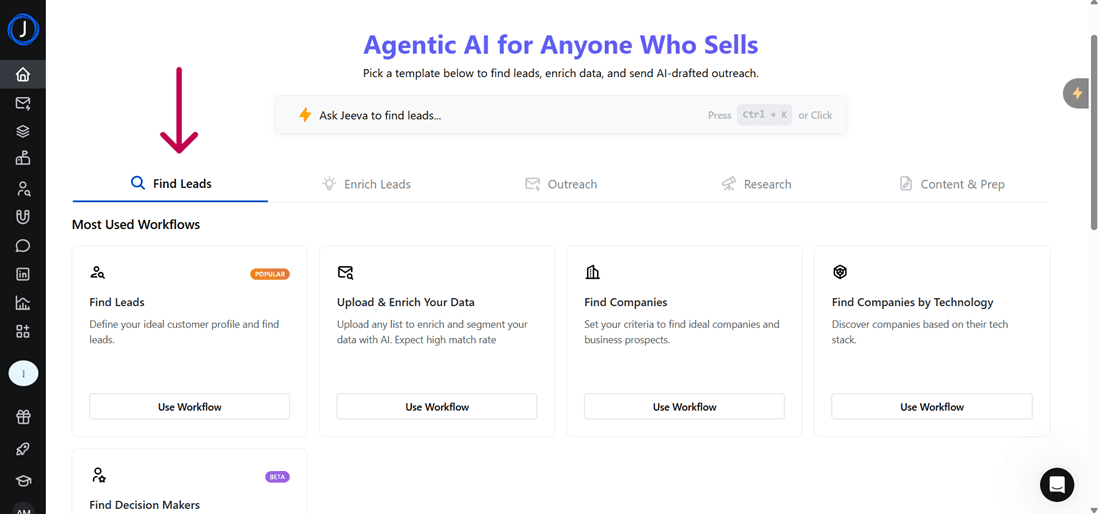
Step 1: Access the Workflow
● From the dashboard, go to Find Leads → Find Decision Makers.
● Click Use Workflow.

Step 2: Single Person Search
● Choose the Single Person tab.
● Enter:
○ Company Website (e.g., company.com)
○ Decision Making Criteria (e.g., CEO, Head of Marketing)
○ Max Leads (set how many results you want)
● Click Enrich Now to run the search.

Step 3: Upload a List (Bulk Search)
● Switch to the Upload a List tab.
● Upload a .CSV, .XLS, or .XLSX file (up to 500 rows).
● The file should include proper headers.
● (Optional) Download the provided template for correct formatting.

Step 4: Next Actions
From here, you can:
● Export and enrich your list.
● Enroll in Campaigns for direct outreach.
● Combine with AI Agent for contextual insights on each leader (e.g., “Find CEOs who recently raised Series B funding”).
✅ Tip: Use titles + department filters together (e.g., “VP” + “Marketing”) for highly targeted leadership lists.
See how fast you can book meetings when AI handles the busy work for you.
Was this article helpful?